You've got an animated logo. Now the question that actually determines how it performs: which file format? The choice affects file size by a factor of up to 100, decides whether it works in email at all, and can make or break your page speed scores. This guide compares Lottie, GIF and MP4 across everything that matters: with real numbers, implementation code, and free browser tools to convert between all three.
The quick answer
- Lottie : best for websites and apps. Smallest files, infinite scaling, full interactivity. Needs JavaScript.
- GIF : best for email and universal compatibility. Largest files, 256 colors. Works literally everywhere.
- MP4 : best for social media and video. High quality, small files. Needs a video player.
And the honest answer for most brands: use all three, each where it wins. More on that below.
Lottie (JSON): the web-native format
Lottie is a JSON-based animation format created by Airbnb and now used across major apps and websites. Instead of storing pixels or video frames, it stores the animation as instructions : shapes, movements, timing, which the browser renders live. Think of it as SVG for motion.
Why Lottie wins
- Tiny files. A logo animation that weighs 2MB as a GIF is often 20–40KB as Lottie. Even intricate animations rarely pass 100KB.
- Perfect at any size. It's vector-based, so it's pixel-crisp from a smartwatch to a 4K display. One file covers every screen.
- Interactive. Play on hover, reverse on click, sync to scroll, swap colors for dark mode, all controllable with JavaScript.
- Performance-friendly. Small payloads and native rendering keep Core Web Vitals happy.
Where Lottie fails
- No JavaScript, no animation. That rules out HTML email, SMS, and any context where scripts are blocked.
- Not everything exports. Advanced After Effects features: certain 3D effects, blend modes, particle systems, may not survive the trip to JSON.
- Needs implementation. You (or your developer) have to wire up the player library.
Got a Lottie file and want to see exactly what's inside it? Our free Lottie previewer lets you scrub it frame by frame, test it on any background, inspect fps and duration, and convert it to GIF or MP4 when you need the same animation somewhere Lottie isn't supported.
GIF: the universal veteran
The format that refuses to die, in service since 1987. A GIF is essentially a flipbook: every frame stored as a full image with a maximum of 256 colors, played in sequence. That flipbook design is exactly why GIFs balloon in size, and exactly why they work absolutely everywhere.
Why GIF wins
- Universal compatibility. Email clients, SMS, forums, chat apps, decades-old browsers, a GIF is treated like any image. Nothing else comes close.
- Zero technical requirements. One
<img>tag. No players, no scripts, no configuration. - Instant to make. Export straight from our free logo animator : pick an effect, download the GIF, no watermark.
Where GIF fails
- Enormous files. A 3-second animation at decent quality easily hits 1–3MB. That's a page-speed problem and often over chat-app upload caps.
- 256 colors per frame. Gradients band, smooth fades get dithered, subtle shading is lost. Fine for flat logos; rough on premium gradient-heavy marks.
- Fixed resolution. A 400px GIF pixelates the moment it's displayed larger.
- No control. It loops forever. No pause, no play-on-hover, no interaction.
If a GIF is too heavy for its destination, don't lower your standards, lower the file size. Our free GIF compressor shows a live before/after size comparison while you tune scale, frame rate and quality; we've written up the exact settings in how to compress a GIF for Discord, email and the web.
MP4: the quality-per-byte champion
Standard video, typically H.264-encoded. Modern video compression is dramatically smarter than GIF's 1980s approach: instead of storing every frame in full, it stores the differences between frames, which is why the same animation can be 15x smaller as MP4 while showing millions of colors instead of 256.
Why MP4 wins
- Best quality-to-size ratio. A 3MB GIF is often a 200KB MP4, and it looks better.
- Full color and smooth gradients. The animation looks exactly as designed.
- Every social platform prefers it. Instagram, TikTok, YouTube, Facebook: video formats get better treatment and better compression than GIFs.
- Optional audio. A sound sting with your logo animation is a genuinely underrated branding move.
Where MP4 fails
- Not an image. You need an HTML5
<video>element; it won't work in email or an<img>tag. - Transparency is awkward. Standard MP4 has no alpha channel, transparent overlays need a MOV/WebM with alpha instead (included in our custom packages).
- Platform quirks. Autoplay policies, forced muting and play-button overlays vary by platform, always test where it will actually live.
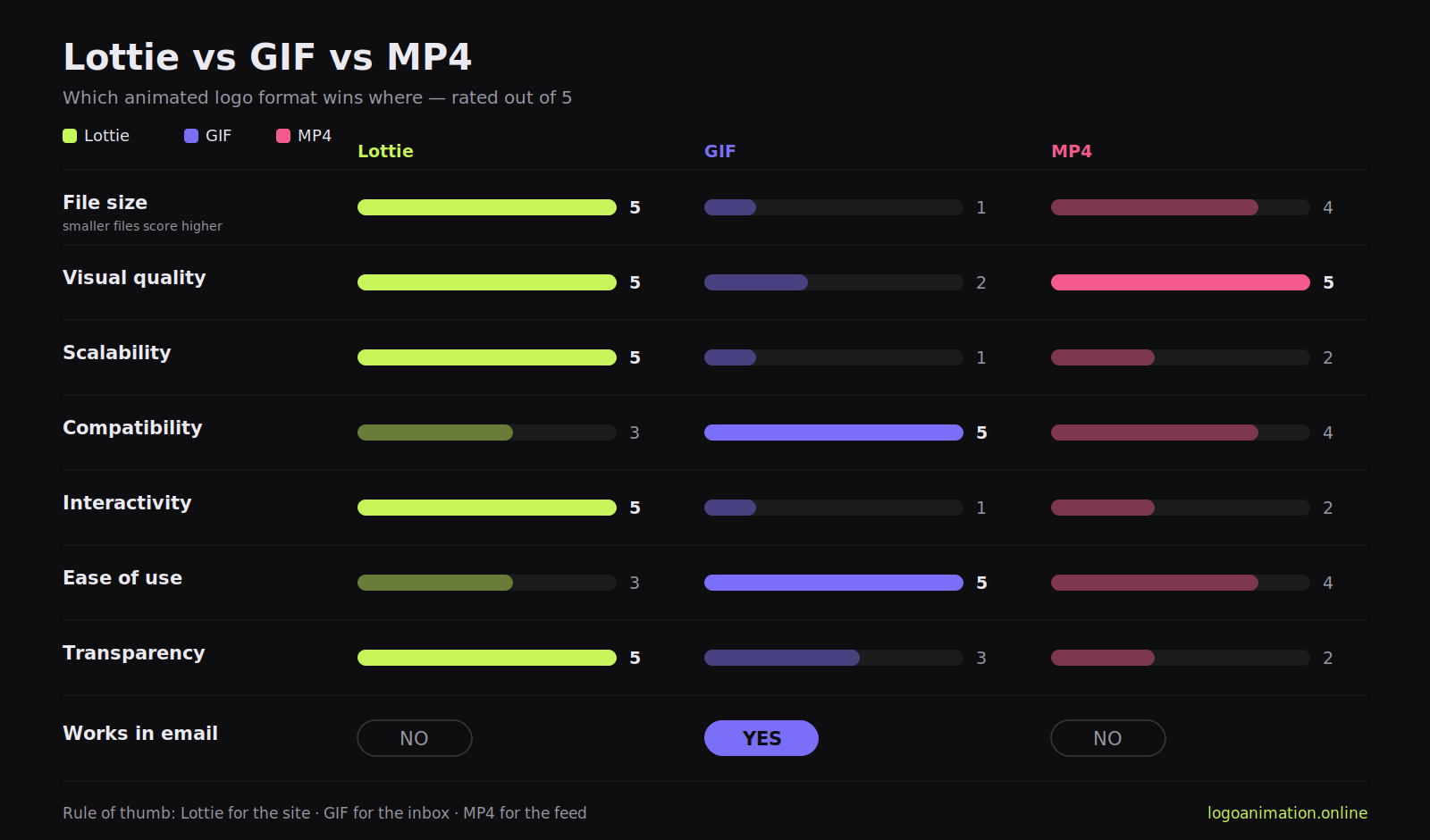
Head-to-head comparison
| Criteria | Lottie | GIF | MP4 |
|---|---|---|---|
| File size | ★★★★★ smallest | ★ largest | ★★★★ small |
| Visual quality | ★★★★★ vector-perfect | ★★ 256 colors | ★★★★★ excellent |
| Scalability | ★★★★★ infinite | ★ fixed size | ★★ fixed size |
| Compatibility | ★★★ modern web | ★★★★★ universal | ★★★★ very good |
| Interactivity | ★★★★★ full control | ★ none | ★★ basic |
| Ease of use | ★★★ needs JS | ★★★★★ plug & play | ★★★★ simple |
| Email support | ✗ no | ✓ yes | ✗ no |
| Transparency | ★★★★★ perfect | ★★★ hard-edged only | ★★ needs alpha codec |
A representative size test
The same 3-second, 30fps, 1000×1000px logo animation of moderate complexity, exported three ways:
- Lottie: ~24KB
- MP4 (H.264, high quality): ~180KB
- GIF (optimized): ~1.8MB
That makes Lottie roughly 75x lighter than the GIF and 7x lighter than the MP4. On a page loaded 10,000 times a month, choosing Lottie over GIF saves nearly 18GB of transfer: which your visitors feel as speed and Google measures as Core Web Vitals.
Which format for which job
Choose Lottie when…
You're building a website or app, file size and performance matter, the animation displays at multiple sizes, or you want interactivity and dark-mode color swaps. Perfect for site headers, loading screens, onboarding flows and dashboards.
Choose GIF when…
It's going in an email signature or newsletter, a chat message, a forum, or anywhere compatibility is non-negotiable and no developer is involved. Keep it small: under ~500KB, 12–15fps, sized to its actual display dimensions, the GIF compressor gets you there in a minute.
Choose MP4 when…
It's going to Instagram, TikTok, YouTube or Facebook, the animation is longer than a few seconds, you want audio, or quality is the priority. Both our logo animator and 3D animator export MP4 directly; if a platform needs a different aspect ratio, the free video cropper snaps to 16:9, 9:16, 1:1, 4:3 and 4:5 without re-rendering.
Implementation cheat sheet
Lottie
<div id="logo-anim"></div>
<script src="https://cdnjs.cloudflare.com/ajax/libs/lottie-web/5.12.2/lottie.min.js"></script>
<script>
lottie.loadAnimation({
  container: document.getElementById('logo-anim'),
  renderer: 'svg', loop: true, autoplay: true,
  path: 'logo-animation.json'
});
</script>
GIF
<img src="logo-animation.gif" alt="Company logo animation" width="400" height="400">MP4
<video autoplay loop muted playsinline width="400">
  <source src="logo-animation.mp4" type="video/mp4">
</video>
Two details people miss: set explicit width/height so the page doesn't jump while loading, and the muted playsinline pair is what allows MP4 autoplay on mobile.
The smart move: don't choose, deploy all three
The brands that get this right export once and deploy by destination: Lottie on the website for speed and crispness, GIF in email because nothing else works there, MP4 on social for quality. Every custom logo animation we craft ships in all three formats (plus transparent video for overlays), and our free tools cover the conversions in between: Lottie → GIF/MP4 and MP4 ↔ GIF, all in the browser.
What about WebP and AVIF?
Both newer formats animate. Animated WebP beats GIF on size and color depth and is now widely supported in browsers, but email client support remains patchy, which removes GIF's one irreplaceable advantage. Animated AVIF compresses even harder but encoding is slow and support is still maturing. Worth watching; not yet worth rebuilding your pipeline around. Lottie, GIF and MP4 remain the practical trio.
Common mistakes to avoid
- Defaulting to GIF for everything. Familiar isn't the same as right, a website hero GIF is a self-inflicted performance penalty.
- Shipping unoptimized files. Even Lottie bloats if the source has unused layers and hidden elements. And no GIF should ever be larger than the pixels it's actually displayed at.
- No fallback. Always set a static image fallback so a blocked script or failed load never leaves a blank hole where your logo should be.
- Untested transparency. GIF transparency is hard-edged (no semi-transparent pixels) and can fringe on dark backgrounds; standard MP4 renders transparency as black. Test on the real background before shipping, a clean transparent source file prevents most of this.
FAQ
Can I convert a Lottie file to GIF or MP4?
Yes. Drop the .json into our free Lottie previewer & converter and export GIF or MP4/WebM directly in your browser.
Why does my GIF look grainy?
The 256-color limit forces dithering on gradients and shading. Flat, solid-color logos convert cleanly; gradient-heavy ones are better served as MP4, with GIF reserved for email.
Which format does an email signature need?
GIF is the only animated format that reliably works across email clients. Compress it hard, here's the exact recipe.
Do I need After Effects to get a Lottie file?
Traditionally yes (via the Bodymovin plugin), which is why Lottie/JSON delivery is included in our custom animation packages , you get the web-ready file without touching After Effects.
Bottom line: Lottie for the site, GIF for the inbox, MP4 for the feed. Try it right now, animate your logo free, export both GIF and MP4, and see the size difference on your own artwork.